
May 2026
Featured update: AI alt text
For visitors who are blind or low-vision, alt text is an essential part of your guide. In the spirit of making it easier to make your guide better, we developed an AI tool that generates expert-level alt text for each of your images.
The AI model was engineered by experts in the fields of digital accessibility, art, and culture. Its suggestions are fully customizable for when you need to make edits.
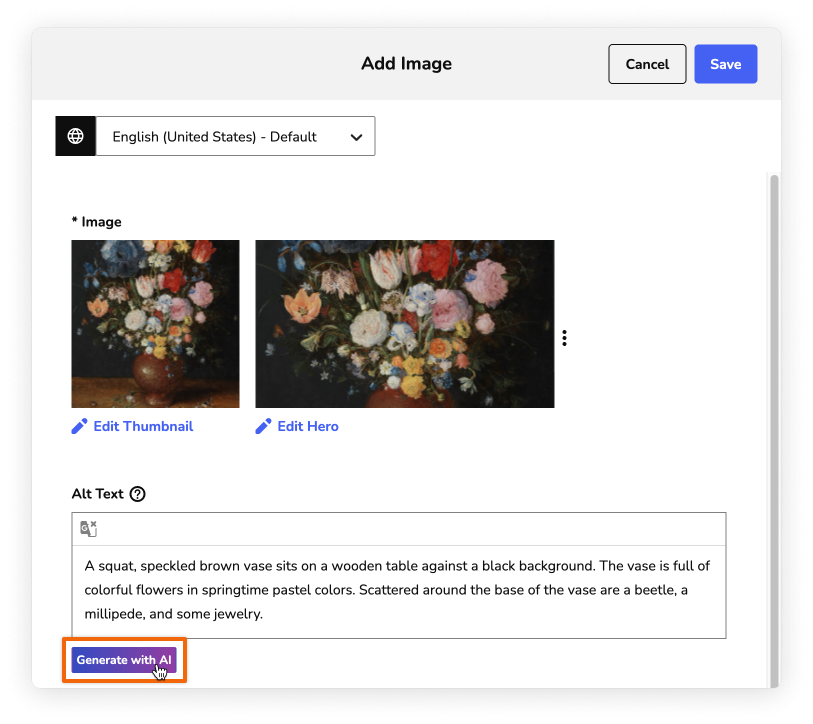
From the Images page of the CMS, you can either add a new image, or open one you already have. In the image form (pictured above), click the Generate with AI button and the tool will analyze your image for about 5–10 seconds. Once it generates the text, you can edit it as much as you want, or accept and save the text.
You can read the full instructions here. For more information on how we developed, trained, and tested our AI model, you can read this article.
CMS updates
- When you create a pin on the map, it's easier to find that new pin among all your others.
- We added several accessibility improvements, including landmarks, table ARIA, TipTap labels, and icon buttons.
- The image cropping tool is now more intuitive and responsive.
Bug fixes
- We fixed a 10-bit H.264 encoding error that was causing causing video playback failure on Android.