
August 2026
AI audio tools: create audio from a script, and generate transcriptions in the CMS
Audio is one of the best ways to engage visitors with your art and offerings. Our studies show that visitors engage more deeply with guides that have audio, compared to guides that don’t. For many visitors, listening to audio is easier than reading text or watching videos on their phones.
Producing the audio isn’t as easy. We hear from many of you that creating high quality audio is simply out of reach. These new tools help bridge that gap in resources. Here’s how they work.
Creating AI audio from a script
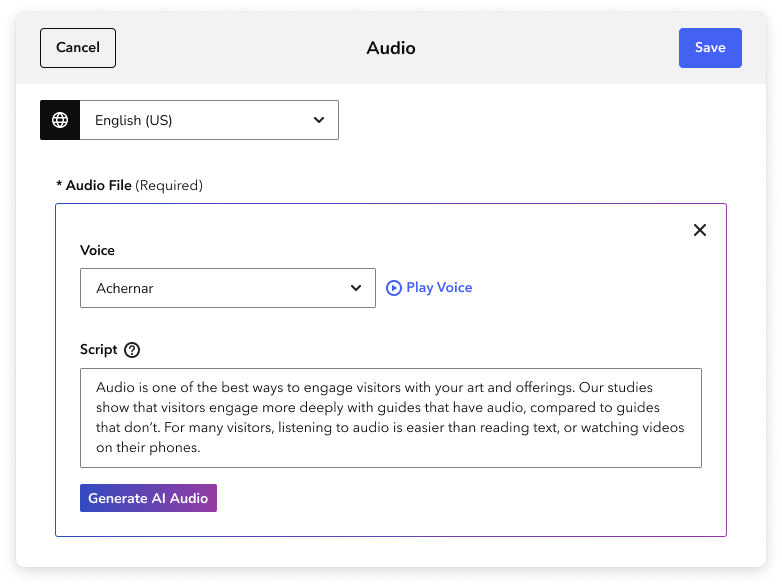
- In the Audio page of the CMS, click the +Add Audio button.
- Click Create AI Audio to open the AI audio tools.
- This is where you add your script. You can click Play Voice to preview the voice options.
- When you’re ready, click Generate AI Audio. It may take up to 2 minutes to create the audio file.
- To attach the file to your Audio asset, you must click Accept to save the Audio. If you don’t want to attach the file, close the menu.
You can create audio in 25 different languages as long as you have a script in the right language.
For more guidance on creating audio, writing scripts, and deciding if this tool is right for your team, read our Best practices for creating AI audio.
You can read more detailed instructions in Creating AI audio from a script.
Generating AI transcripts
- In any audio form without a transcript, you can click the Generate AI Transcript button to get a transcription of your audio file.
- After a few seconds, you can read and review the transcript.
- If you’re pleased with the overall result, you can click Accept (or Accept and Replace) to start reviewing and editing the transcript.
Because this content is generated by AI software, it’s crucial to review the transcription before you publish it to visitors. Read our complete guidance on proofreading in our Audio and video transcripts article.
Note: If you currently produce and record your own audio, these tools are not meant to replace that process. We always recommend producing audio with people when time, budget, and resources allow.
CMS updates
- The Transcript field for audio and video can be resized, making it easier to write and edit text.
- Fixed Spanish translations of "Hero" and "Thumbnail" images.
- Fine tuned small pieces of text and white space.
- New error designs take up less space on the screen.
- Added support for Yucatec Maya and Nahuatl locales.
- Fixed a bug that hid botanical items from a menu of items that can be added to exhibitions and tours.
App updates
- Replaced the iOS platform to make the app perform better.