
February 2026
Featured update: Content drafts replace guide drafts
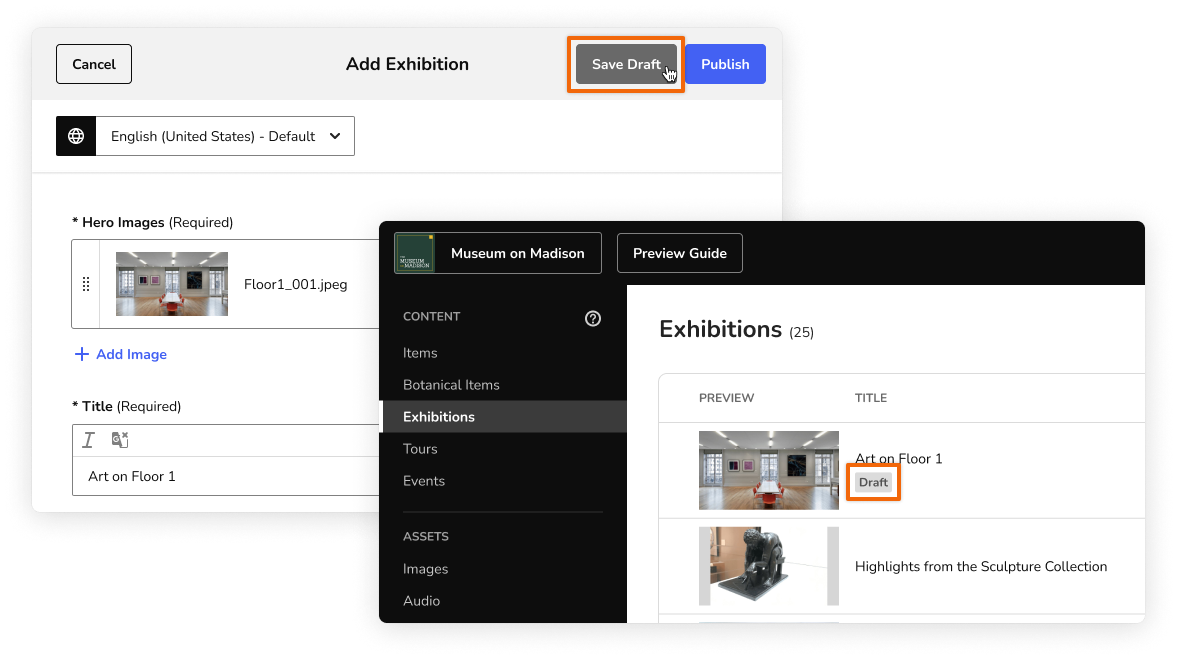
Now you can save individual drafts of your content—Items, Exhibitions, Tours, and Events—while you work. Publish each piece of content when it’s ready for visitors.
Because each piece of content can be edited and published independently, you no longer need to switch between versions of your entire guide or manually mark content as “visible” or “hidden” to manage your changes.
For more information, see Manage drafts and published content.
CMS updates
- Focus on finalizing in-progress content by filtering your content page to see draft content only. You can also choose to see published content only.
- A "draft" label appears at the top of the content form when your changes are saved as a draft, so you know that visitors can't see the new content yet.
- The "Show on Map" field no longer appears in the Exhibition, Item/Botanical Item, and Event forms. You can add content to your map pins on the Map page instead.
- Clearly indicate when an Exhibition includes films on view using a new header for the included Items: "Now Playing."
- New Exhibitions use the "Highlights" section header by default, though you can always select another option for a better fit.
- To help new partners organize their guide's home screen, the Home page is populated with four example sections by default. New partners can edit, reorder, or delete the example sections as needed.
Bug fixes
- In the CMS, we fixed an issue with applying rich text formatting like bold and italics. Now when you highlight text to apply formatting to it, your cursor doesn't jump around, so your changes are applied as expected.
- Fixed an issue with tracking traffic to Items with an ampersand (&) in the title.